RSS.app vs Feedly vs Inoreader: Which One Is Actually Right for You?
RSS has seen renewed interest in recent years as more people look for ways to follow content without relying on social media algorithms, recommendation engines, and increasingly closed platforms.
Instead of hoping an algorithm shows the right content, RSS puts users back in control. Subscribe to the sources you care about, receive updates directly, and build your own information stream.
But once someone decides to use RSS, a new question appears: which RSS tool should you use?
Feedly, Inoreader, and RSS.app are three of the most popular options, but they were built for very different purposes.
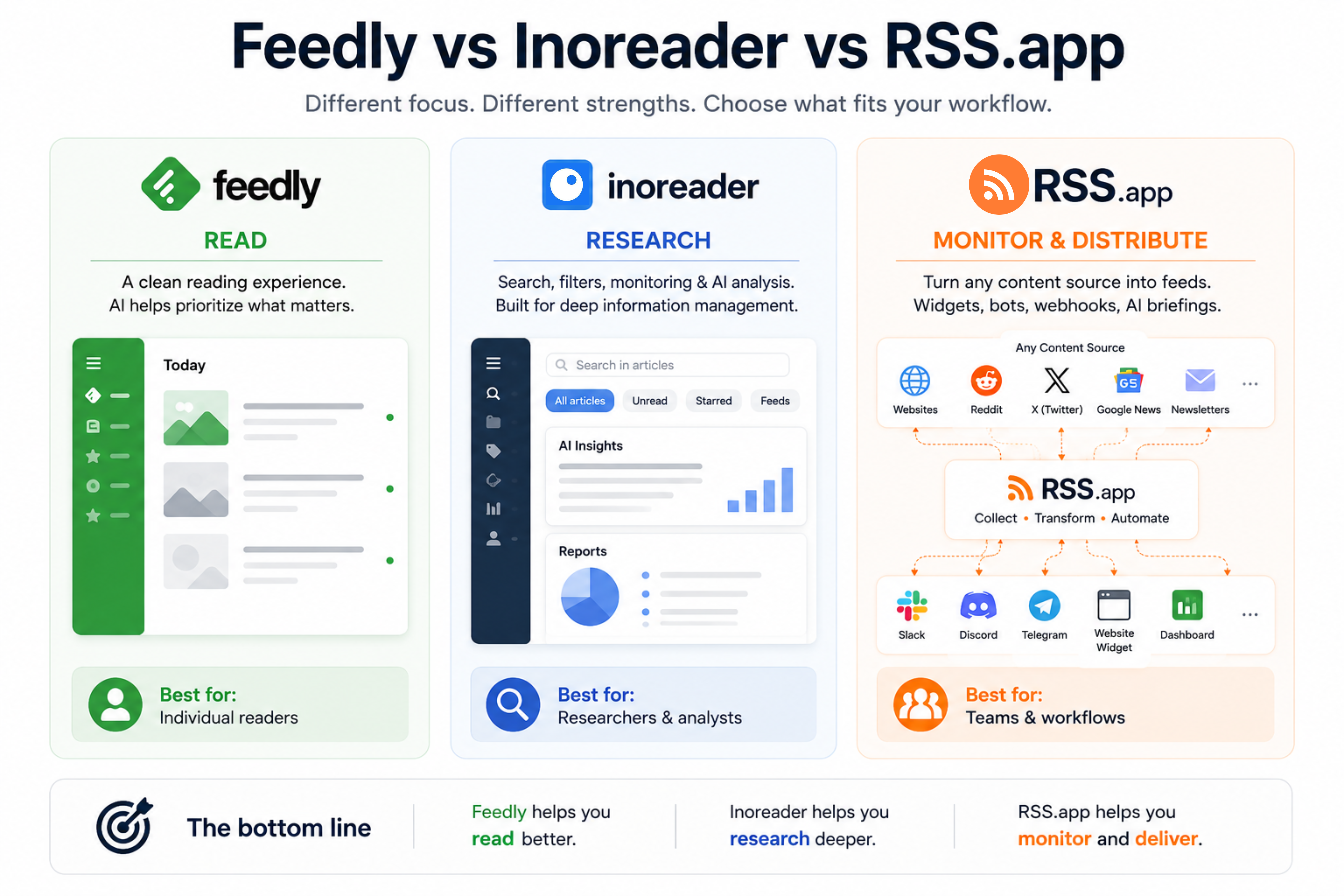
First: What are we actually comparing?
Before we dive in, it helps to be honest about what each tool was built to do.
Feedly and Inoreader are RSS readers. They're built around the idea that you, a human, sit down and read through a curated list of articles. You subscribe to blogs, news sites, and publications. Content flows into your inbox. You read it. That's the loop.
RSS.app is an RSS platform, built around generating, managing, and distributing content. Yes, you can read feeds with it. But its real strengths are in creation and automation: turning any website or social profile into an RSS feed, embedding live content widgets on your website, and auto-posting to Slack, Discord, Telegram, or email.
If Feedly and Inoreader are designed to help you consume and research information, RSS.app is designed to help you monitor, transform, and distribute it.
That framing matters a lot for the rest of this comparison.
Who should use Feedly?
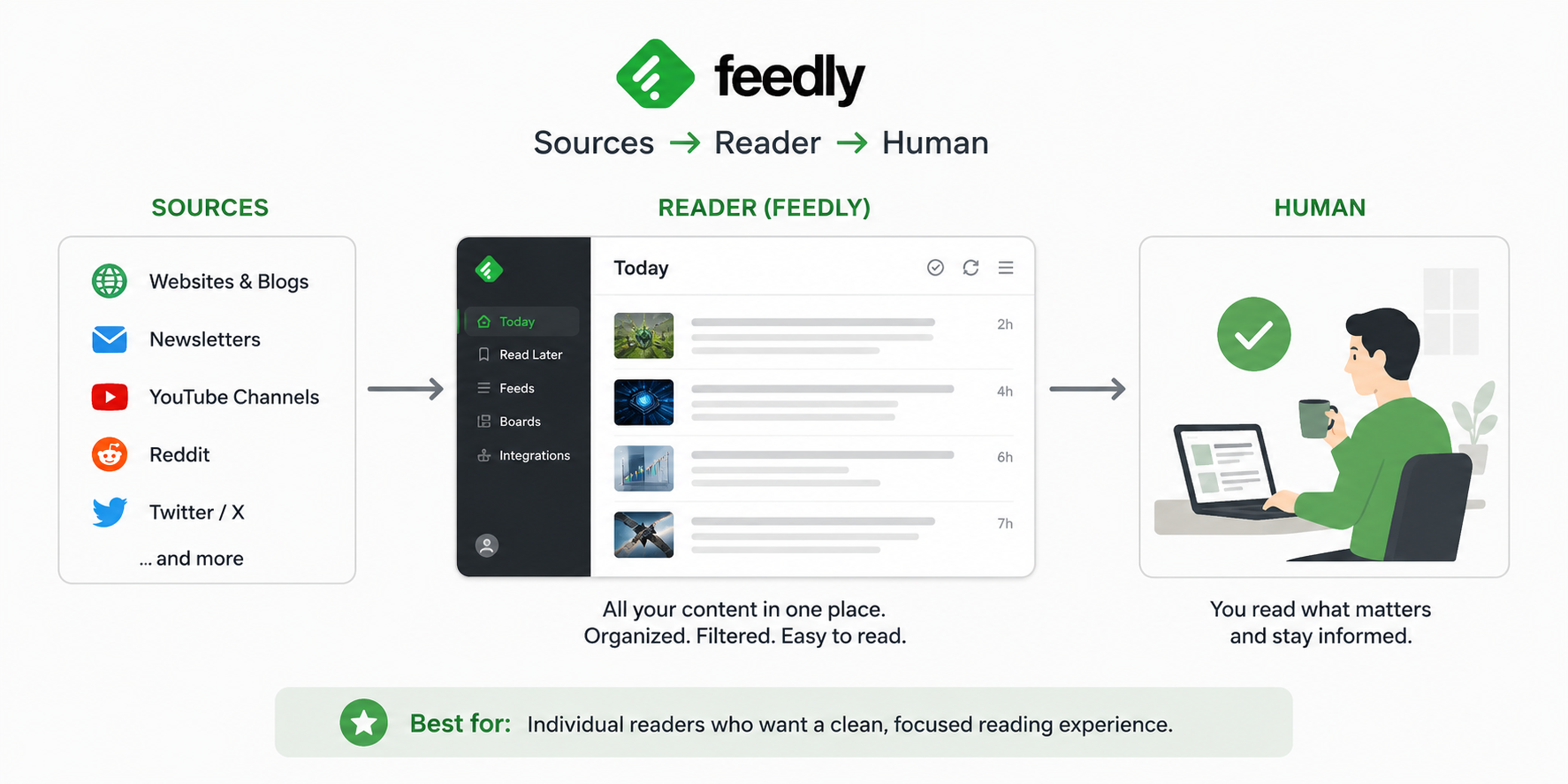
Feedly is probably the most well-known RSS reader today. It's a solid product for people who want to stay on top of industry news without drowning in it.
Over the last few years, Feedly has also expanded beyond traditional RSS reading. Its higher-tier plans include market intelligence, threat intelligence, and monitoring capabilities aimed at teams that need to track specific signals across large amounts of content.
What it does well:
- Beautiful, distraction-free reading experience
- AI-powered feeds (their AI can prioritize or filter stories from across the internet by topic)
- Team collaboration features on paid plans
The catch: Feedly is built around helping you discover and understand information. It does an excellent job of surfacing relevant content, but once you've found it, the workflow largely assumes a human is going to read, review, or share it.
Who it's for: Marketers, analysts, researchers, founders, and knowledge workers who need an efficient way to monitor large amounts of information and stay informed on specific topics.
Who should use Inoreader?
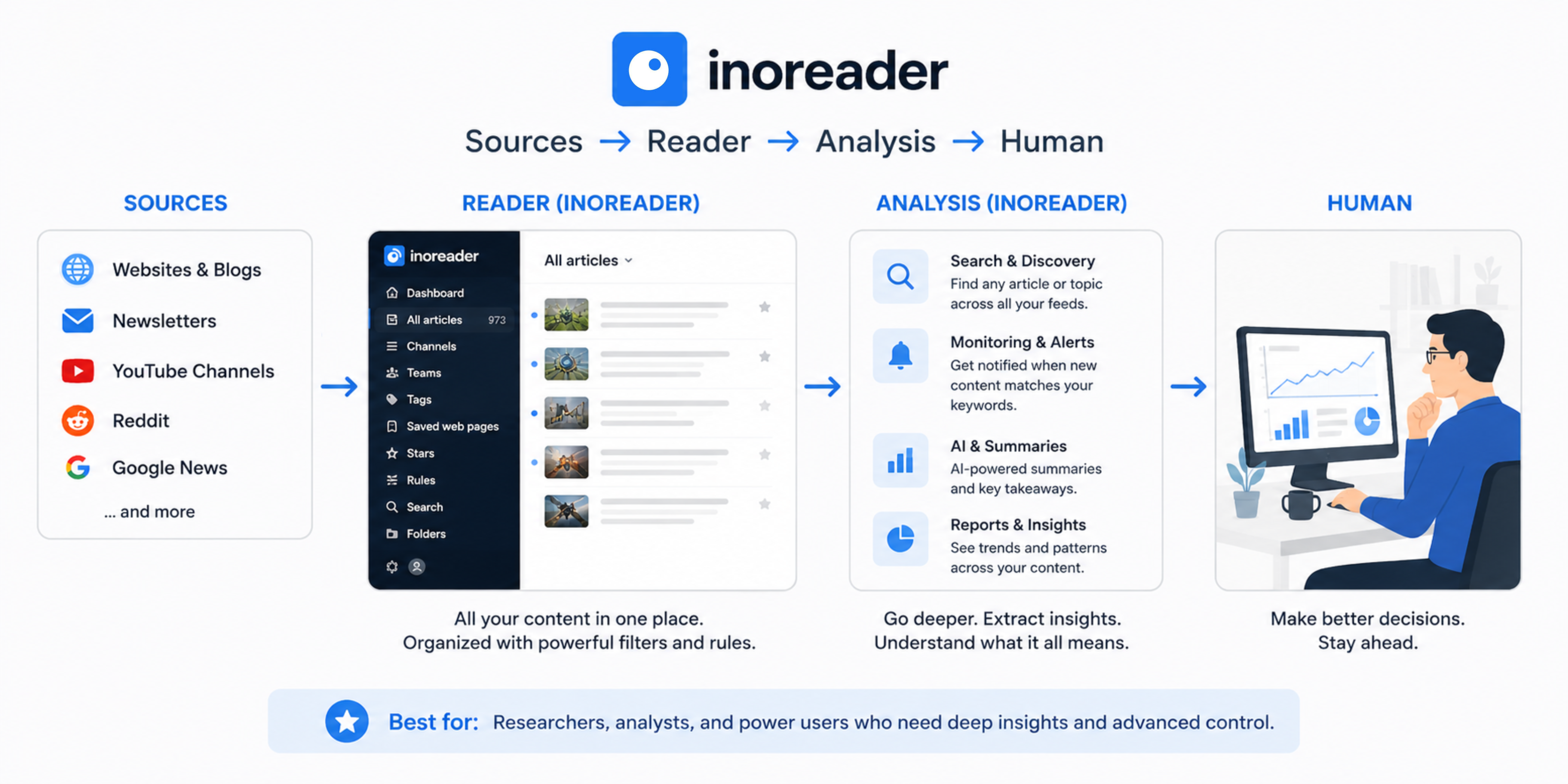
Inoreader is what you graduate to when Feedly starts feeling too simple.
It has more features than almost any other RSS reader out there: rules and filters, monitoring alerts, newsletter integration, search across your entire feed history, and decent automation tools. If you want fine-grained control over what shows up in your feed and how it's organized, Inoreader delivers.
What it does well:
- Extremely powerful filtering and rules engine
- Monitor keywords across all subscribed feeds
- Active search (monitor the web for new content on a topic)
- Can handle thousands of feeds without breaking a sweat
The catch: Inoreader packs a huge amount of functionality into one platform. Rules, filters, monitoring, automation, and integrations are all powerful, but the interface can feel overwhelming at first. There's a learning curve before you start getting the full value from the platform.
Who it's for: Power users, journalists, analysts, and researchers who live in their RSS reader and want maximum control over what they see and how they see it.
Who should use RSS.app?
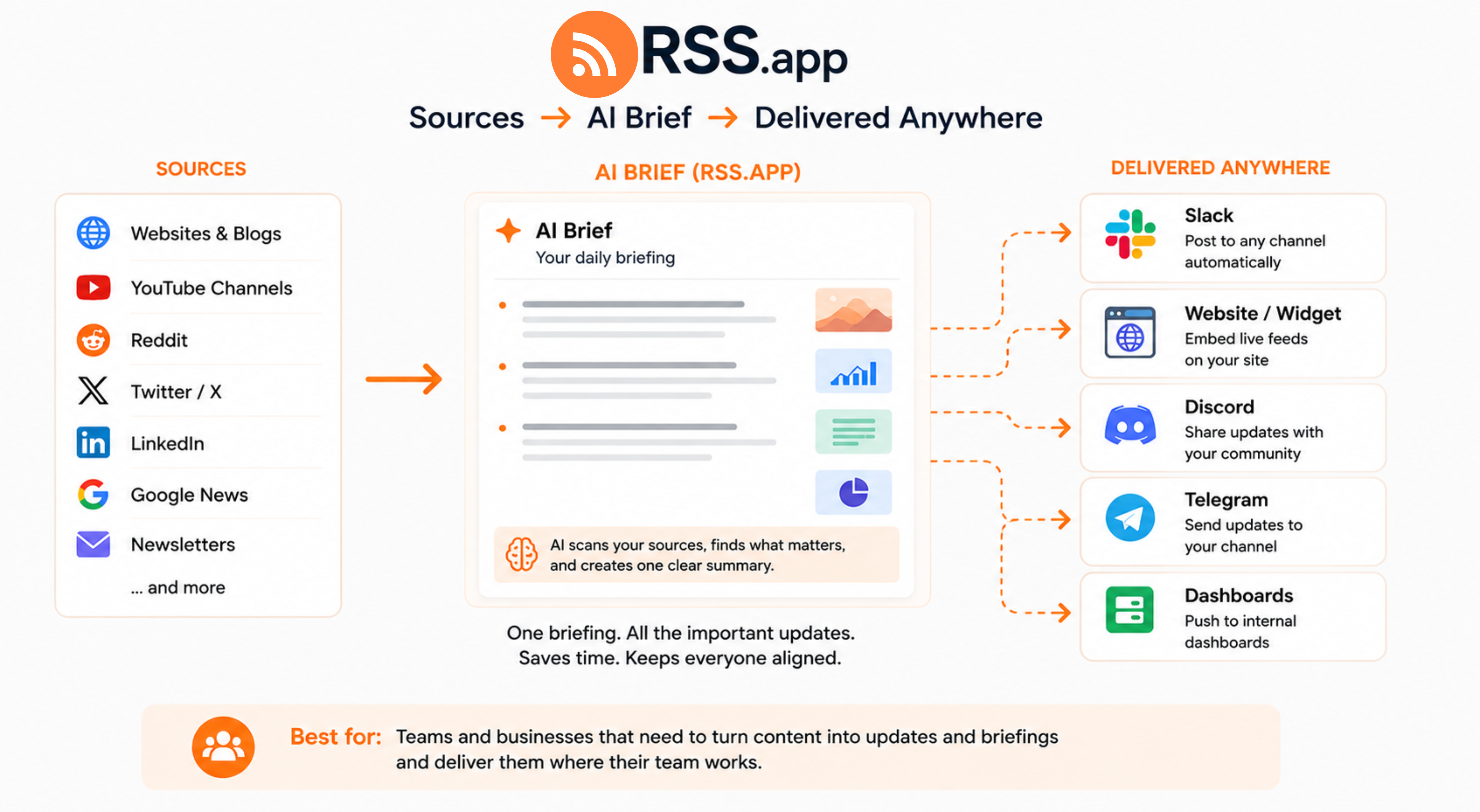
RSS.app is built for turning the open web into structured content, and then distributing it wherever you need it.
Let's get concrete about what that actually looks like.
1. Generate RSS feeds from anything
Most websites still have RSS feeds. But plenty don't: social media profiles, niche forums, landing pages, YouTube channels without native feed links.
RSS.app lets you generate a valid RSS feed from basically any URL, no coding required. You can create feeds from:
- Almost any website or blog
- YouTube channels
- Instagram, TikTok, LinkedIn, Reddit, Twitter/X
- Google News results for any keyword
- Email newsletters
2. Embed feeds anywhere
Feedly and Inoreader primarily display content inside their own apps. RSS.app lets you take that content and put it somewhere else, specifically, embedded directly on your website via customizable, ready-made widgets.
3. Auto-post to Slack, Discord, Telegram, and email
This is probably RSS.app's most distinctive feature set: built-in automation bots.
You can set up workflows that take content from any RSS feed and automatically post it to:
- A Slack channel (great for keeping a team updated on competitor news, industry coverage, or brand mentions)
- A Discord server (popular with communities, content creators, crypto projects)
- A Telegram channel or group
- Email alerts
4. Webhooks, integrations, and feed customization
RSS.app doesn't just collect content. It gives you control over how that content is structured before it reaches other tools.
You can customize feed output by controlling things like whether descriptions contain HTML and where images appear in feed items. Instead of simply reading content inside an RSS reader, teams can shape and standardize the data before sending it to websites, AI tools, databases, Slack channels, Discord servers, or custom automations.
RSS.app also includes built-in webhook delivery. Because the platform manages feed processing and deduplication before sending updates, webhook workflows are often more reliable than generic RSS triggers in third-party platforms like n8n, which can struggle with duplicate entries.
Who it's for: Marketers, growth teams, community managers, developers, content teams, and anyone who wants to do something with web content rather than just read it.
How do Feedly, Inoreader, and RSS.app use AI?
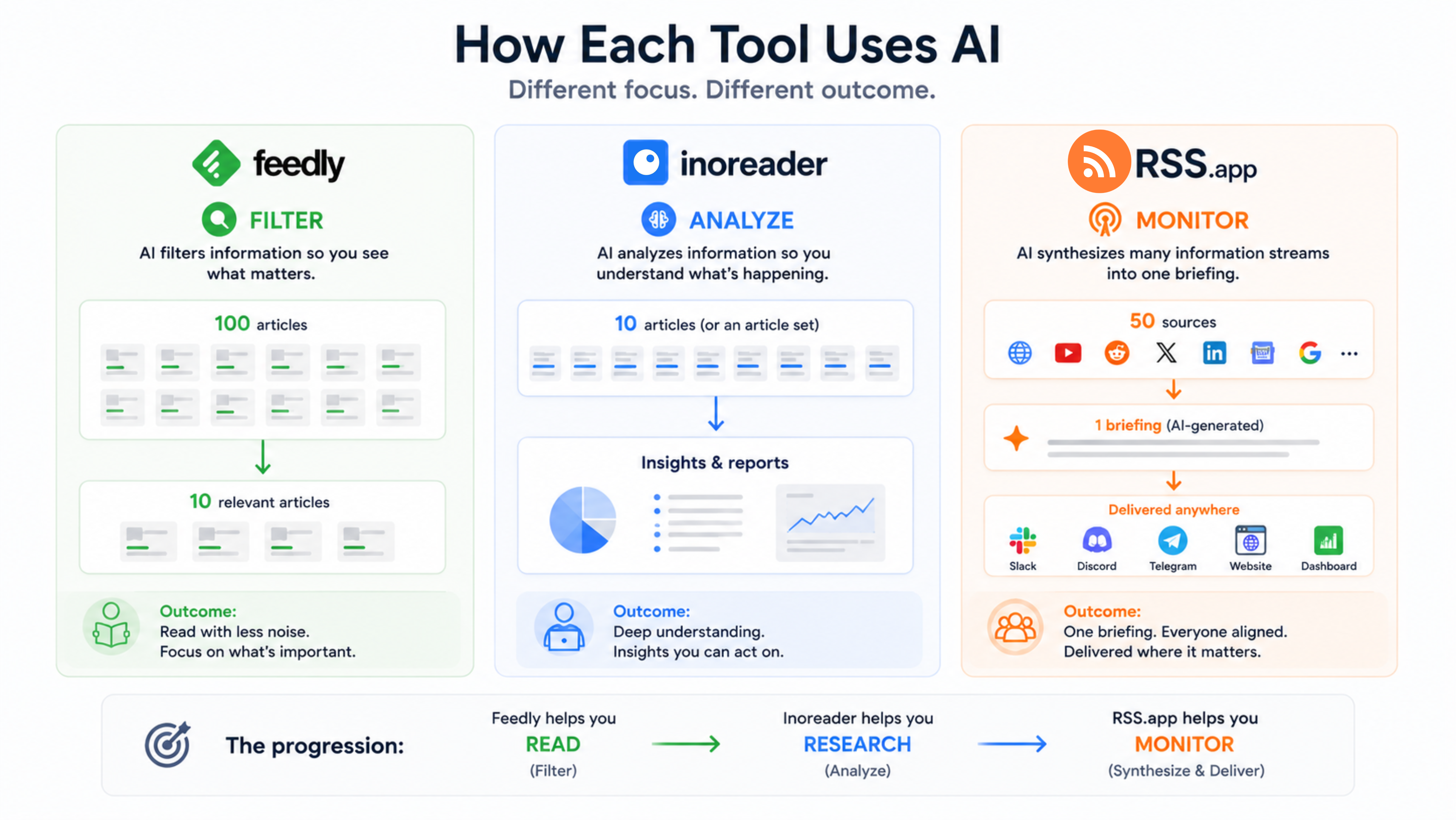
AI has become a major differentiator in the RSS space, but each platform is using it in a very different way.
Feedly: AI for filtering
Feedly's AI acts as an editorial filter. It prioritizes articles based on topics, trends, and keywords you care about, removes duplicate stories, and helps surface the most relevant content across the internet. On higher-tier plans, it can also track business events, cybersecurity threats, and other signals across the web.
The limitation: It's excellent at filtering information, but the output is still a list of articles waiting to be read.
Inoreader: AI for analysis
Inoreader's AI suite focuses on helping users understand content faster.
It can summarize articles, answer questions, run custom prompts, and generate reports that combine insights from multiple articles into a single briefing. Users can even connect their own OpenAI, Anthropic, or Mistral API keys for additional flexibility. The goal is not just to find information, but to analyze it.
The limitation: Inoreader's AI is most valuable when you're actively researching a topic, investigating a trend, or working through a collection of articles. It's designed to help users extract insights from content, rather than continuously monitor sources and generate recurring briefings for a team.
RSS.app: AI for briefings
Users can bundle together feeds from websites, newsletters, Google News, Reddit, social media searches, competitor sites, and other sources. AI Brief then generates a recurring summary based on those sources.
That summary can be set to deliver wherever your team already works: Slack, Discord, Telegram, website widgets, internal dashboards, RSS readers, and automation platforms can all receive the same AI-generated summary on a schedule.
This makes RSS.app particularly useful for competitor monitoring, brand tracking, industry news monitoring, and executive updates. Instead of checking dozens of sources or manually compiling reports, teams receive a recurring briefing based on a curated set of sources.
The limitation: RSS.app is less focused on article-level research and analysis than Inoreader. Its strength is automated monitoring, recurring briefings, and distribution.
💡 The Summary: Use Feedly if you want to clean up your personal reading list. Use Inoreader if you want to heavily analyze, tag, and chat with data. Use RSS.app if you want to pull data from annoying, non-RSS websites, have an AI automatically synthesize it into a clean daily brief, and broadcast it straight to your team's Slack channel or company website without wrestling with complex automation workflows.
How do Feedly, Inoreader, and RSS.app compare?
| RSS.app | Feedly | Inoreader | |
|---|---|---|---|
| Primary purpose | Feed generation + distribution | Feed reading | Feed reading |
| Reading experience | Basic | Excellent | Good/Utilitarian |
| Create feeds from any URL | ✅ Yes | ⚡ Limited | ⚡ Limited |
| Social media feeds | ✅ Yes | ⚡ Limited | ⚡ Limited |
| Embeddable widgets | ✅ Yes | ❌ No | ⚡ Limited (HTML clips with basic customization) |
| Auto-post bots (Slack/Discord/etc) | ✅ Yes | ❌ No | ✅ Yes (via webhooks) |
| Keyword/topic monitoring | ✅ Yes | ✅ Yes | ✅ Yes |
| AI approach | AI-generated briefings from multiple sources that can be distributed anywhere | AI filters and prioritizes content to read | AI summarizes, analyzes, and reports on content |
| Best AI use case | Team briefings, competitor monitoring, executive updates | Personal news filtering and prioritization | Research, analysis, and intelligence reports |
| Zapier/Make integration | ✅ Yes | ✅ Yes | ✅ Yes |
| Filtering & rules | ✅ Yes | ✅ Yes | ✅ Yes (best-in-class) |
| Best for | Teams and workflows | Individual readers | Researchers and analysts |
Which RSS tool is right for you?
The honest question isn't which tool is best. It's what you're actually trying to solve.
If the problem is information overload (too many tabs, too much noise, no system), Feedly is the fastest path to a calmer reading routine. It's designed to make reading feel manageable again.
If the problem is that you need to understand what you're reading, not just consume it, Inoreader gives you the tools to go deeper. Expect a learning curve; it pays off.
If the problem is that information is stuck in your inbox or browser and your team never sees it (or you need content showing up on your site without manual updates), RSS.app operates at a different layer entirely. It's less about reading and more about distribution.
The lines between these categories are not absolute. Feedly includes monitoring features, Inoreader includes automation and distribution options, and RSS.app includes AI analysis through AI Brief. The difference is where each platform places most of its emphasis.
Want to try RSS feeds?
Create your first feed in minutes. Free to start, no credit card required.
Share this article


Ready to get started?
Create your first RSS feed in minutes. No coding required.