You Have an RSS Feed. Now What?
So you learned what RSS is: websites publish updates to a feed, an RSS reader fetches them, and you get content without algorithms or inbox clutter.
That explains how RSS works. It does not explain what to do with it.
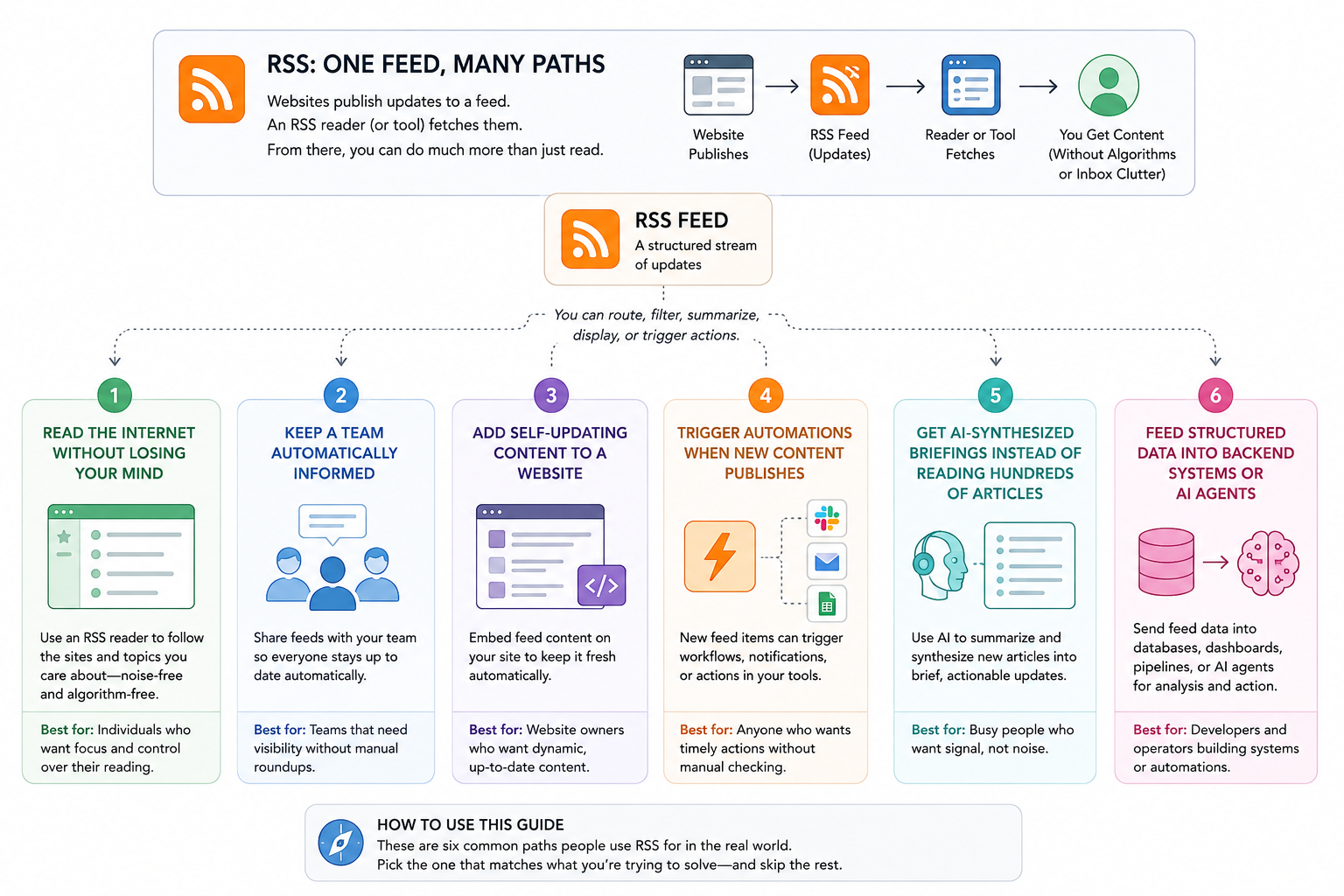
Most RSS explanations stop at “subscribe in a reader.” In practice, a feed can do far more. RSS is simply a structured stream of updates that software can route, filter, summarize, display, or trigger actions from.
You can use a feed to:
- Read the internet without losing your mind
- Keep a team automatically informed
- Add self-updating content to a website
- Trigger automations when new content publishes
- Get AI-synthesized briefings instead of reading hundreds of articles
Feed structured data into backend systems or AI agents
This guide walks through six common ways people actually use RSS. Pick the one that matches what you are trying to solve and skip the rest.
First: Why you cannot just "open" an RSS feed
Paste an RSS feed URL into your browser and you will usually see something like this:

That is not broken. RSS packages content into a structured format that software can read. It's meant for machines, not humans. To get anything useful out of it, you need to point it at the right tool for your goal.
Path 1: You want to read less noise
Best for: Bloggers, researchers, or anyone drowning in browser tabs and newsletter emails.
The problem: Your news comes from algorithms, newsletters pile up, and checking the same sites every day becomes its own chore. You want updates from sources you chose in one place, in chronological order.
What to do: Get an RSS reader. Think of it as a private, chronological inbox for content only, with no algorithm and no ads. Popular options:
- Feedly — best for teams and power users
- Inoreader — best for heavy filtering and rules
- NetNewsWire — free, open-source, Mac and iOS
Paste your feed URL into a reader and subscribe. It strips away the raw XML, formats everything cleanly, and shows updates newest-first. Subscribe to Ars Technica, a few industry blogs, and a couple of newsletters, and you have replaced a scattered daily browsing routine with one dashboard that updates itself.

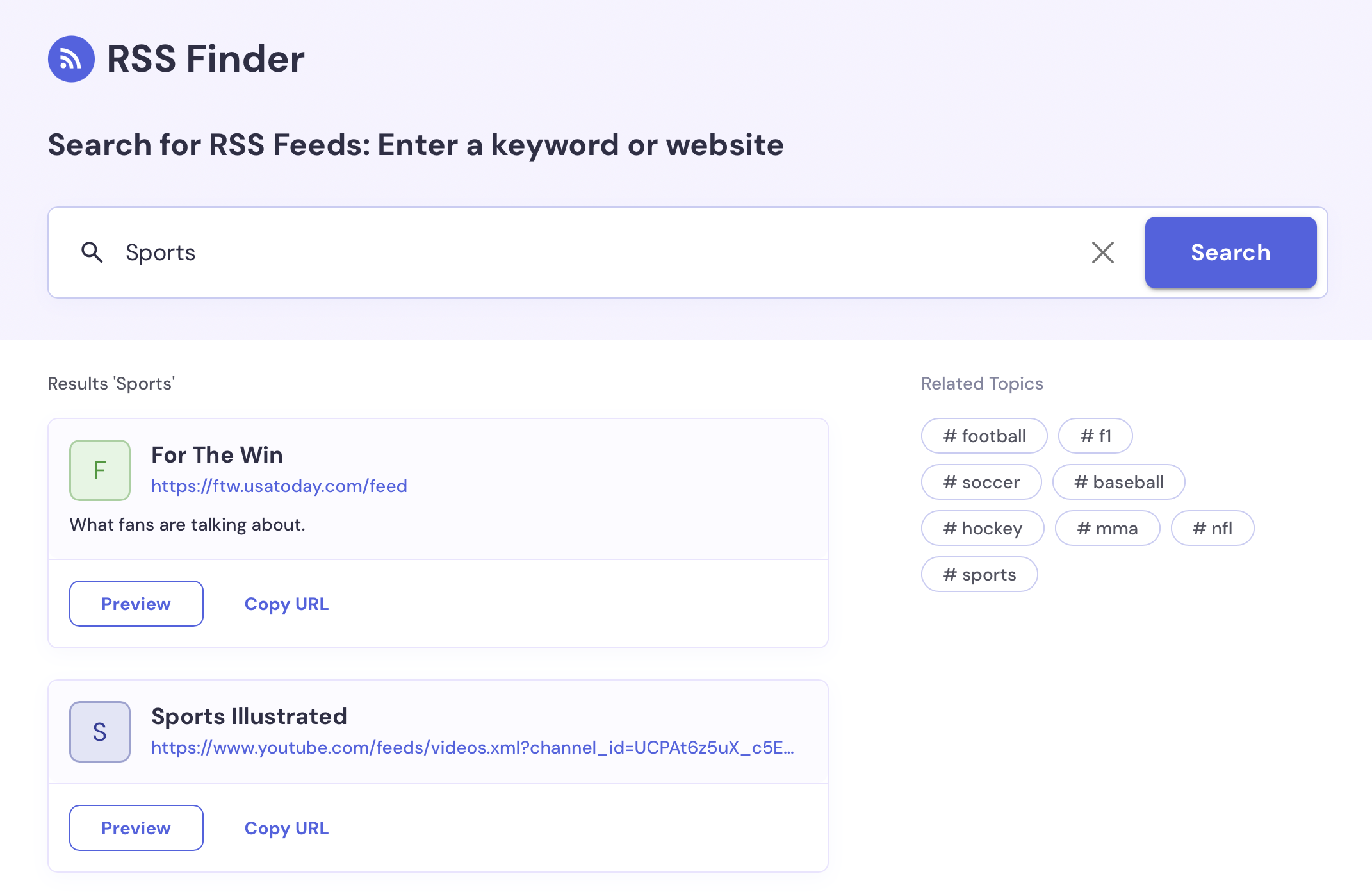
Take it further: First, you need feeds to subscribe to. Many websites already publish RSS feeds but you just may not see them. Use RSSFinder.app to quickly find RSS feeds for websites, blogs, podcasts, newsletters, and more.
No RSS feed available? Create one with RSS.app. Turn almost any public webpage into a feed, including news sites, blogs, company updates, social media profiles, or niche sources that do not publish RSS natively. For websites with unusual layouts or dynamic content, RSS.app's Builder provides additional control over what gets extracted.
Want less noise? Run feeds through RSS.app before they hit your reader. Follow The Verge but only care about AI coverage? Add a keyword filter so only articles mentioning “AI” or “machine learning” appear. Following sources in French or Japanese? Translate feeds automatically before they arrive in your reader.
Path 2: You need to keep a team informed without extra work
Best for: Community managers, team leads, Slack and Discord admins.
The problem: You spend real time every week manually copying and pasting articles into group channels. Nobody has bandwidth to babysit a feed.
What to do: Bring the content to where your team already works. RSS bots connect a feed directly to Slack, Discord, or Telegram. When new content publishes, it is automatically delivered as a formatted message in the channel you choose.
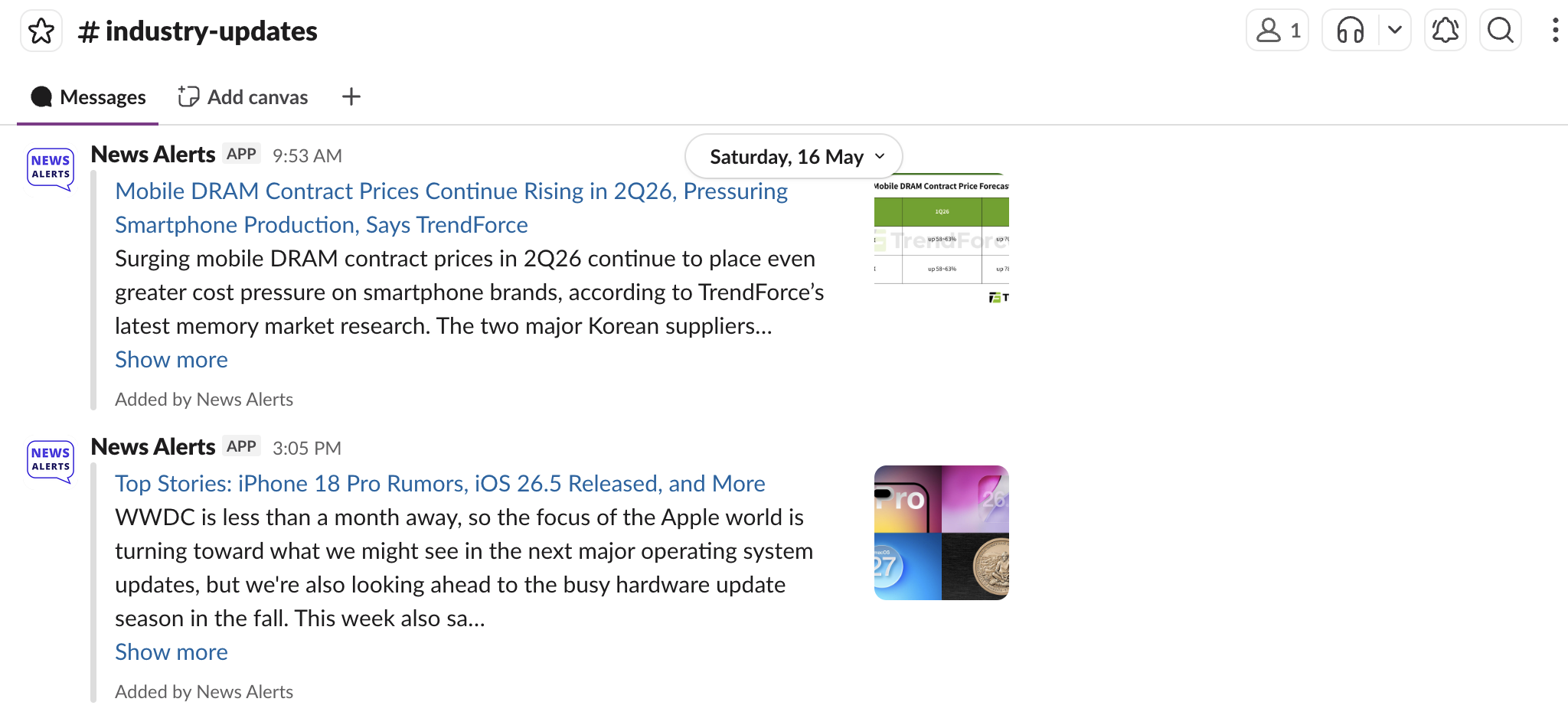
Example: A product marketing team tracks competitor announcements, industry news, and feature launches. Instead of checking ten websites every day, updates flow automatically into a #market-intel channel where the whole team can follow along.
RSS.app includes native bots for Slack, Discord, and Telegram, so you can connect feeds directly without relying on third-party automation tools or custom code.
Take it further with RSS.app: Tracking twenty publications? RSS.app's Bundles feature merges them into a single master feed. One URL to manage instead of twenty. Add a keyword filter so only high-signal articles get posted.
Path 3: You want your website to feel current without touching it
Best for: Website owners, marketers, agencies maintaining content-heavy sites.
The problem: Your "Latest News" section is stale because updating it manually never gets prioritized. At the same time, a site that looks current builds more trust and gives visitors more reasons to stay.
What to do: Embed an RSS-powered widget on your site. When the feed updates, the content on your website updates automatically. No CMS edits, code changes, or maintenance.
How it works:
- Create a feed from a source you want to display with the RSS Generator: industry news, company updates, blog posts, YouTube videos, or your own content.
- Then choose a widget layout and add a single embed code to your website.
From that point forward, updates happen automatically.
Examples of what this looks like in practice:
- A law firm displays legal and regulatory news on its homepage
- A cybersecurity company embeds threat intelligence updates
- A B2B SaaS company curates industry coverage
- A university department automatically displays recent publications and announcements

RSS.app widget layout options by goal:
| Goal | Widget to use |
|---|---|
| Show latest blog posts | Feed or List widget |
| Display authority-building news | News Wall or Magazine grid |
| Add movement to a dashboard | Scrolling news ticker |
| Visual content gallery | Carousel |
Path 4: You want to trigger automations on new content
Best for: Zapier, Make.com, or n8n users who want content events to kick off workflows.
The problem: You want new content from a website to automatically start a chain of actions somewhere else.
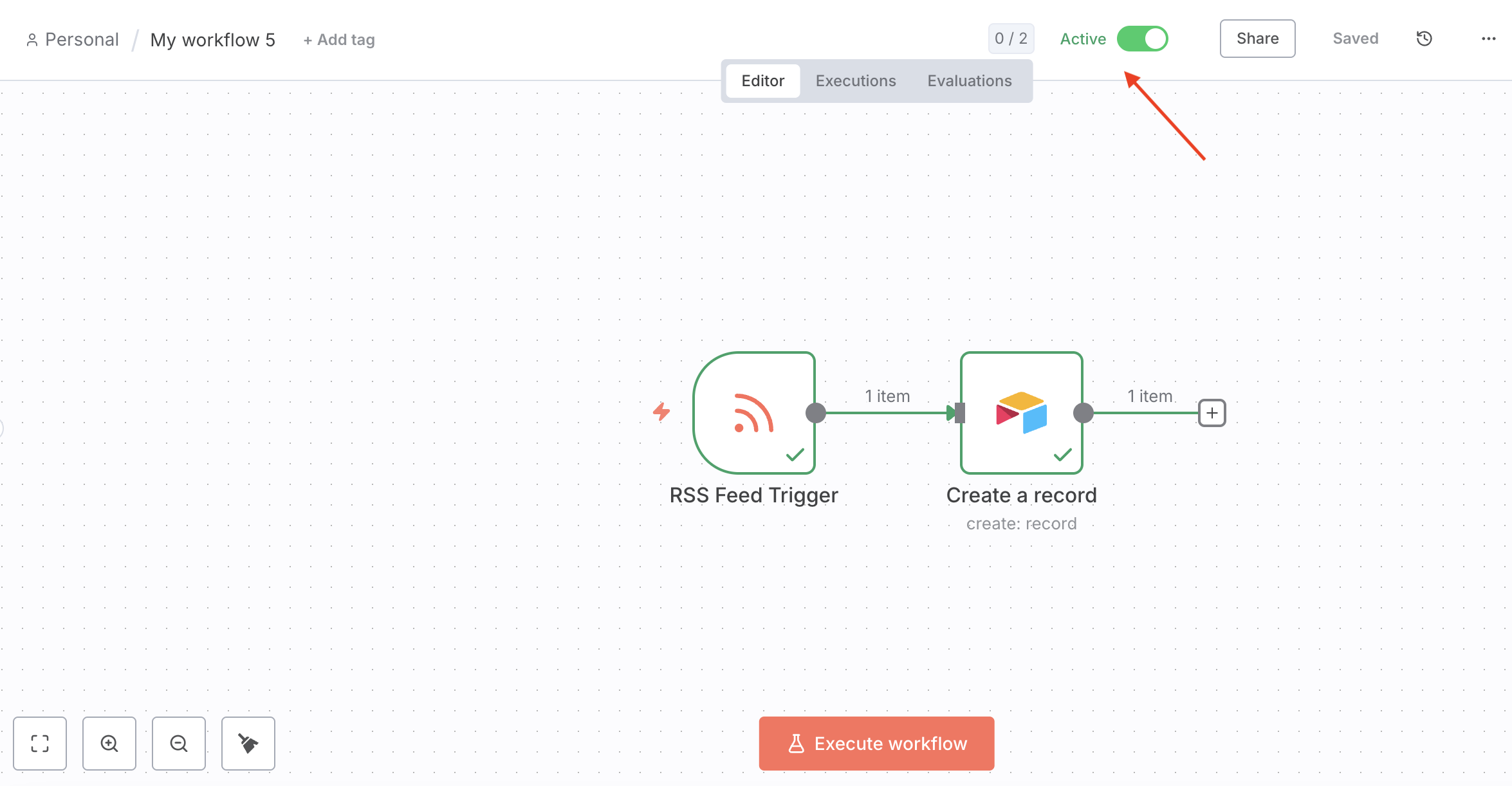
What to do: Most automation platforms support RSS as an event source. When a feed publishes a new item, your workflow can run automatically. That means content can become an input for other systems.
Example: A market research team watches competitor blogs and industry news. Every new article automatically gets added to an Airtable database through n8n, tagged by source and ready for analysis, with no one monitoring websites manually.
Take it further with RSS.app: Most modern websites, social platforms, and forums no longer publish native RSS feeds. No .xml link means nothing to trigger your automation.
RSS.app's RSS Generator solves this. Paste any standard URL, including a LinkedIn company page, a Google News search, or a subreddit, and RSS.app builds a working feed from it. Drop that URL into Zapier or Make and you can automate content from platforms that never intended to support it.
Path 5: You are drowning in information and need a summary
Best for: Researchers, executives, and analysts who must stay informed but cannot read everything.
The problem: You need signal from two hundred articles a week. Reading them is not realistic.
What to do: Use RSS.app's AI Briefs. Instead of reading, you receive a synthesized briefing.
How it works:
- Group your sources into an RSS.app Bundle
- Turn on AI Briefs, choose a personality and format that fits your purpose, and set a delivery schedule
- The system reads every article, identifies what matters, and sends a structured summary to wherever you work
Example: A VP of Product tracks ten SaaS publications, five competitor blogs, and three VC newsletters. Every Monday morning, instead of a backlog of unread tabs, one structured email arrives summarizing the week's most relevant developments.
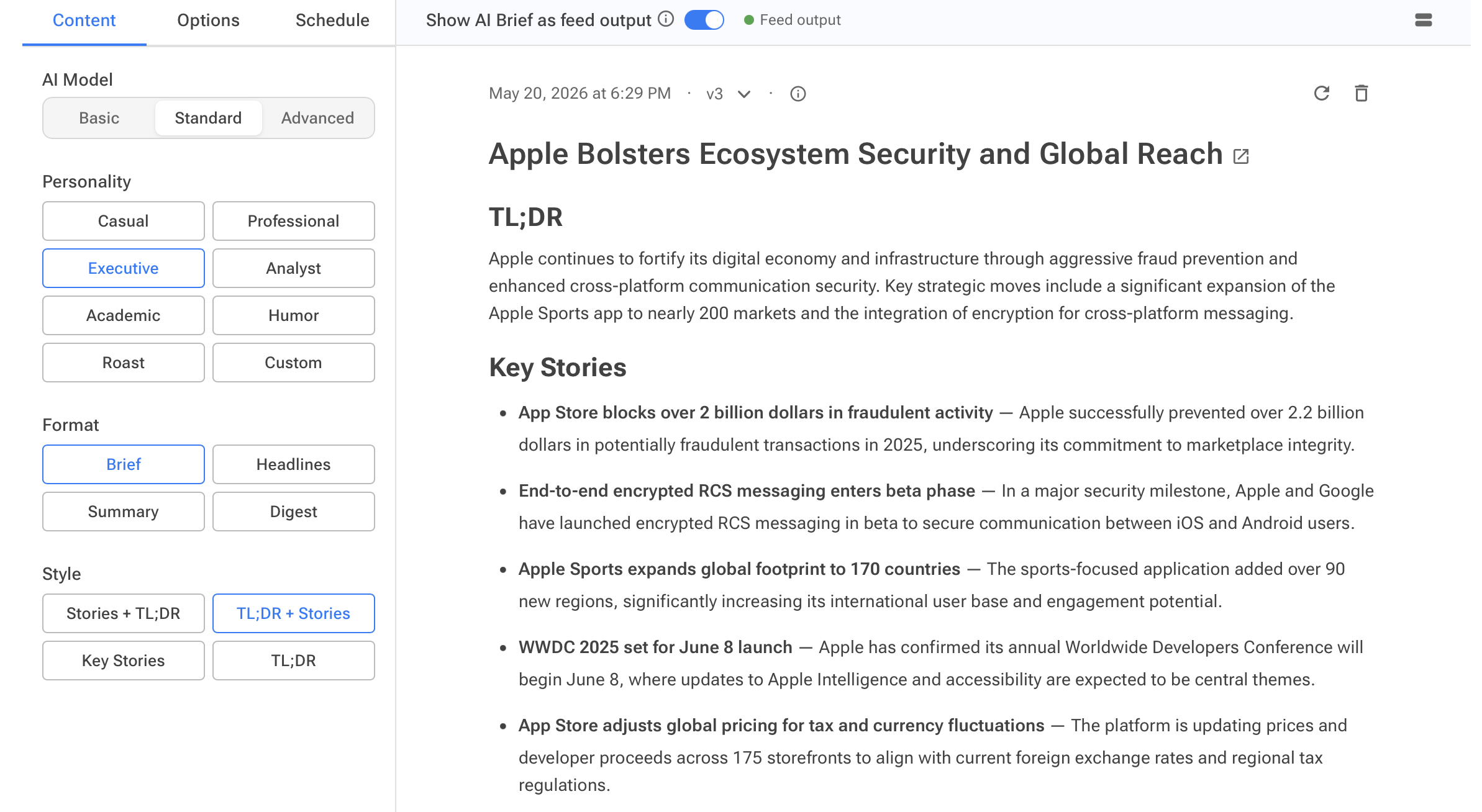
Choose an analytical persona (Analyst, Executive, or Journalist) to shape the tone. The result is a private intelligence briefing from sources you chose and verified, not an algorithm's guess.
Path 6: You need clean, structured data for a backend system
Best for: Developers and data engineers building apps, pipelines, or AI agents.
The problem: Custom scrapers break whenever a site redesigns. You need a reliable, normalized data layer.
What to do: Use RSS.app as a normalization layer. It converts web sources into standardized formats:
- JSON / CSV — queryable and easy to parse
- REST API endpoints — standard HTTP access
- Webhooks — your server receives a push payload each time new content publishes, eliminating continuous polling
Example: A compliance monitoring system watches legal and government websites. Each new filing is pushed via webhook, normalized into JSON, and stored in a vector database for an internal AI assistant to query.
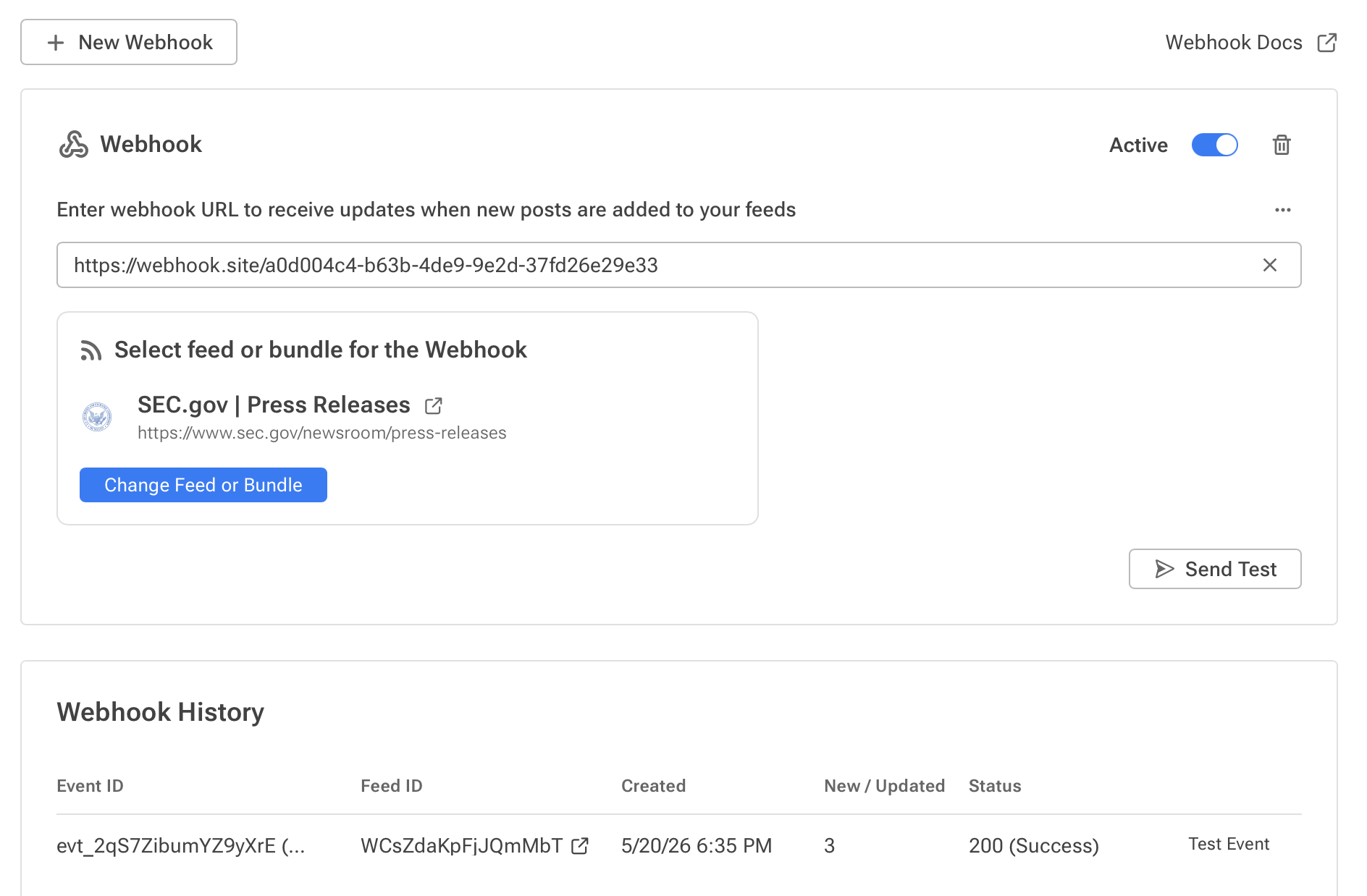
For AI agent development, this matters especially. RSS feeds can stream directly into context windows or vector databases, giving agents access to current, domain-specific information instead of relying only on historical training data.
Where to start
An RSS feed is only useful once you connect it to something.
That might be a reader, a Slack channel, a website widget, an automation, an AI briefing, or a backend system.
Start with the problem you are trying to solve, then pick the workflow that fits.
Want to try RSS feeds?
Create your first feed in minutes. Free to start, no credit card required.
Share this article



Ready to get started?
Create your first RSS feed in minutes. No coding required.